
RIG Riot on Steam Deck
Playable, not Verified — full controller, camera comfort, HUD opacity, and a demo you should test on the handheld first.
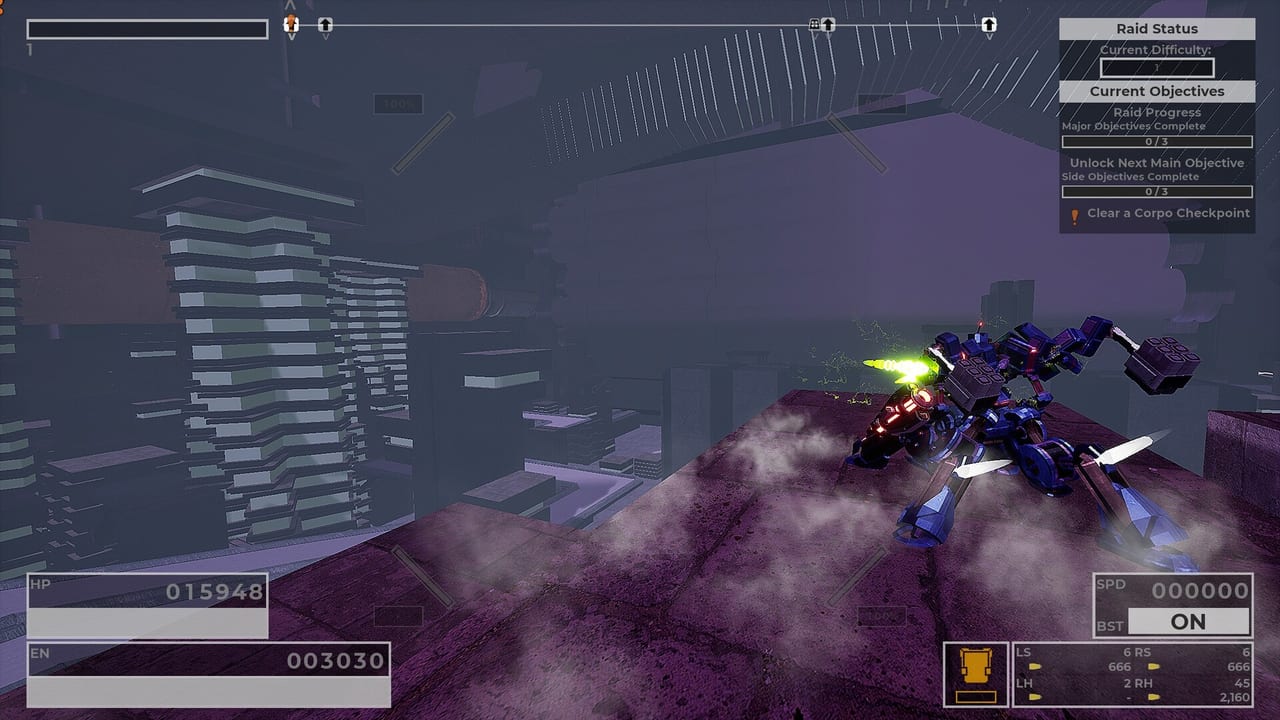
Steam rates RIG Riot Playable on Steam Deck, not Verified. That is the whole compatibility sentence. Sage Boatman has said they intend Deck-friendly 60 FPS after settings tweaks; an earlier public note also talked about locking 40 FPS with effects and shadows on Low or Medium. Both statements can be true at different points in development. Steam lists a September 14, 2026 launch window. A demo can be downloaded on Steam and itch.io. Test the demo on the Deck you own before you spend money. This page does not upgrade Playable into Verified.
Read system requirements for the Windows desktop minimum (GTX 960 / 8 GB / DX12). Read controls for binds, HUD, and garage keys. Official platform is still Windows; Deck is a Steam handheld running that Windows build through Steam’s compatibility stack. Linux/Proton chatter in the press is unofficial.
What Playable actually includes
Store flags that matter on a handheld:
- Full controller support. Xbox-style pads are listed. Deck’s own controls count. Use a community layout if the default camera feels heavy.
- Camera comfort. You will be in third person, boosting, and wall-kicking. Turn this on if the camera fights you.
- Custom volume. Raids are loud. Missiles and death-proc lightning are louder.
- Adjustable difficulty. If Playable frames dip, lowering difficulty is a legal tool, not a shame flag.
- Playable without timed input. No QTE. Boost timing is still on you.
- HUD opacity slider. The Deck screen is smaller than a monitor. If HP, EN, SPD, BST ON, and LS/RS/LH/RH bury the objective, drop opacity.
- Photosensitivity warning. Public notes added it. Take it seriously on a handheld held close to your face.
Playable means Steam believes you can finish a session with tweaks. Verified would mean Valve signed a default experience. RIG Riot is the first one. Plan tweaks.
Settings, layouts, and the 40 vs 60 FPS conversation
Sage’s earlier Deck note recommended:
- Framerate cap: 40 FPS
- Vsync: On
- Effect quality: Low or Medium
- Shadow quality: Low or Medium
- Text scale: 1.2–1.5
Later comments talk about intending 60 FPS after more tweaks. On a launch-window Deck, start at the conservative cap, then raise if the demo holds. Do not start at 60 and then blame the builds page when hover tanks the frame time.
Community layout: grab one if look sensitivity on the right trackpad or gyro fights wall kicks. The tutorial still applies — look, BST on/off, jump, still wall height, moving wall kick, held flight boost. Deck users skip this list at their own risk. Semi-auto-as-auto is a gift on Deck rifle lanes.
Garage on Deck: Esc/Enter/Q/E/F/R/middle-mouse are desktop keys. On a pad, use the on-screen prompts. Public notes adjusted font scaling so controller players can see stats. Text scale 1.2–1.5 is how you read RIG stats on a 7-inch panel. Garage customization still applies; your thumbs are just larger relative to the UI.
What to test in the demo before you buy
Do not test a screenshot. Test a raid:
- Tutorial pop-ups all the way through. If look or BST toggle feels wrong, fix the layout now.
- One Scout or Watcher biped hop: hover, wall kick, flight boost. EN drain is the Deck tax.
- One Quad grounded dash string. Burst frames often hurt more than hover frames.
- A missile/AR volley and a shotgun interior. Particle density is the Playable test.
- A Fire Demon-style gatling fight (the enemy whose gatling was nerfed 210 to 60 per projectile). If the alpha strike still tanks FPS, drop effects, not HP.
- Garage: cycle parts, save a loadout, read stats at 1.2+ text scale.
If any of those six fail on your unit, stay on desktop or wait. Demo notes and launch notes are the timing pages. Getting started and how to play are the raid pages once the handheld behaves.
Desktop GTX 960 / 8 GB is not a Deck promise. Deck is its own APU. Official min spec stays on system requirements. Official Steam platform stays Windows. If Proton on a non-Deck Linux box works, treat it as unofficial luck.
Combat ranks do not change because you are sitting on a couch. Sniper, missile/AR, and blade/shotgun lanes on the weapon tier list still need EN and capacity. Volatile Mods still cap at six. Builds still mix Scout, Scrapper, Bulwark, Assassin, and Watcher. Deck only changes whether you can see BST ON when it drops.
Next steps for a handheld session
Install the demo on the Deck, apply a community layout, cap frames conservatively, drop effects and shadows, raise text scale, and set HUD opacity until the objective beacon is visible. Then complete the six-point raid test above. If it holds, go to controls and lock binds; if it does not, go back to system requirements and use a desktop. Playable is a warning label with a path, not a Verified sticker you can skip.
Frequently Asked Questions
Quick answers to the most common RIG Riot questions.
Is RIG Riot Verified on Steam Deck?
No. Steam rates it Playable, not Verified. Test the demo on your handheld. A demo can be downloaded on Steam and itch.io.
Did the developer promise 60 FPS?
Sage said they intend Deck-friendly 60 FPS after settings tweaks. An earlier public note also recommended a 40 FPS cap. Start conservative, then raise if the demo holds.
What accessibility flags help on Deck?
Camera comfort, custom volume, adjustable difficulty, playable without timed input, HUD opacity slider, and a photosensitivity warning.
Should I use a community layout?
Yes if default look or trackpad fights wall kicks. Tutorial inputs are still required — see controls.
Does the GTX 960 min spec apply to Deck?
No. That is the Windows desktop minimum on system requirements. Deck is its own APU with a Playable rating.
Is Linux official because Deck exists?
No. Official Steam platform is Windows. Deck runs that Windows build through Steam’s handheld stack. Desktop Linux/Proton is unofficial.